2019
The new VCmaster - Innovations for tomorrow
VCmaster 2019:
The new release provides enhanced
functionality that significantly speeds up working with VCmaster.
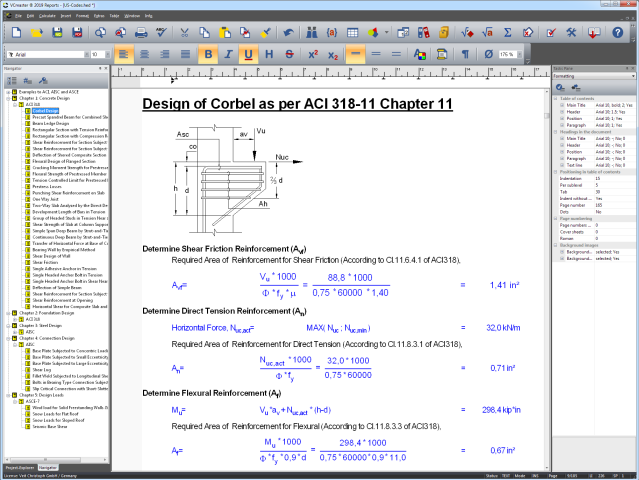
The development of VCmaster this year focused on redesigning the
program interface. The new design provides enhanced functionality
that significantly speeds up working with VCmaster. The programming
is based on the latest Microsoft-development technologies and
secures the potential for future development of VCmaster.
This is what the new interface offers:
1) New styles: Twenty-two different styles are
available to customize the user interface. All menu bars can be
placed conveniently, adjusted in size and supplemented by any
buttons.
2) Navigation: The table of contents has been
integrated directly into the program interface. This provides a
better overview and facilitates the call-up of the item to be
edited.
3) Project data: The new project explorer connects
all project data with VCmaster. Thereby, e.g. PDF-documents,
structural analysis or CAD-data can be opened directly from the
VCmaster program interface.
4) Task pane: Formatting can be adjusted here, tasks and notes about the project can be managed and information about the document can be edited.
For more information about the new interface, see chapter
5.1.
Further additions and adjustments
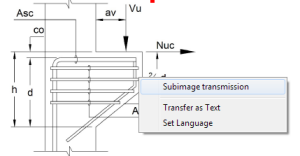
Image transfer via the t2W-interface: The insertion
of a graphic (for example from a CAD program) is simplified via the
function Subimage transmission. The four sides are cropped
automatically, so that the image is transmitted without frames. The
action is made via the right mouse button.
Intelligent presentation of results: Values of
variables can be shown even if they are defined or calculated after
the location of the output. This allows, for example, the representation
of a value in a heading, in preliminary remarks
or in the table of contents. See also
chapter
2.9.
Open files: It can be specified whether VCmaster
should be started multiple times, if for e.g. in Windows-Explorer
several files can be opened with a double-click. This is done
in Extras-Settings-Open all files in a program.
2018
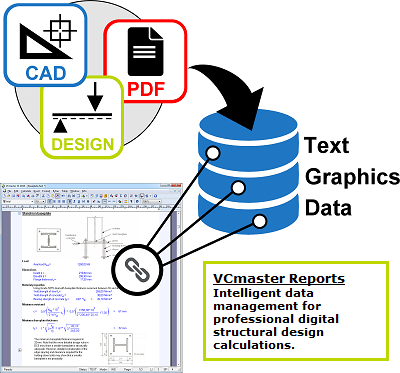
This year's
focus for the advancement of VCmaster has been on enhancing automation for reporting, checking processing states and including additional options for customization. VCmaster has been revised in many aspects to achieve this goal.
Major improvements:
- Automated reporting due to intelligent presentation of results
- More flexibility due to customizable hot keys
- Simplified data transfer due to intelligent character recognition (OCR technology) and PDF/A export
- VCcompare for analysing PDF-documents and processing states (optional)
- New templates to US-codes (ACI, AISC and ASCE) and British Standard (BS EN) available for free download

Intelligent Presentation of Results
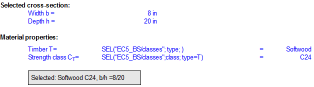
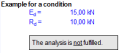
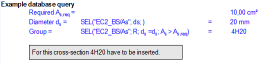
Results such as materials,
cross-sections or information for implementation can be
linked intelligently to the calculation part and are thus presented automatically.
The result can then be complemented and highlighted by a frame. Stroke weight, color or background are fully customizable.
Examples presented on the right side visualize the various application areas. More information
can be found in
Chapter 2.9.
Additionally variables can now be placed freely within a text and can also be included in the print-out.
|
|
 |
 |
 |
Automatic Text Recognition
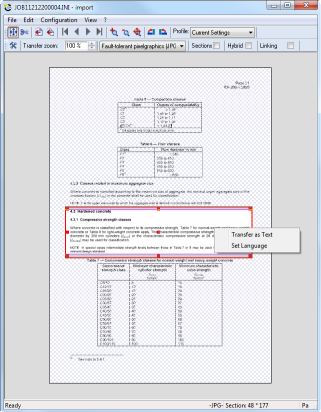
The t2W-interface recognizes and transfers texts from any document (image). The technology behind this is called OCR - Optical Character Recognition.
This technology allows you to convert scanned (digitized) images of printed or handwritten text into a form that can be recognized and manipulated by a word-processing program such as alphabets, words, and numerals.
Thus simplifying quoting from literature, standards or manufacturer's information.
For more information, refer to
Chapter 3.5.3.
Furthermore the t2W-layout has been enhanced. The area to be transferred is now displayed more distinctly, while the remaining part of the information is presented in grey.
Professional Tools for Reporting
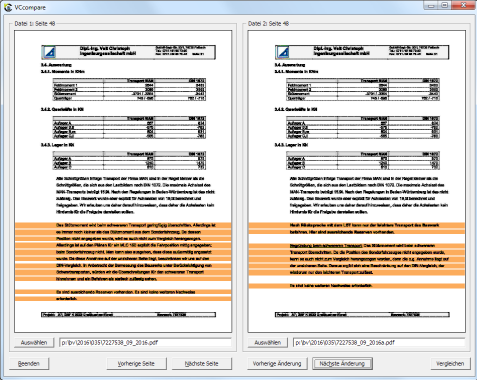
VCcompare analyses differing processing states and PDF-files and highlights the dissimilarities (image).
VCcompare is available optionally. For more information refer to
Chapter 5.3.3.
PDF-Export: PDF/A compatibility can be selected optionally (standardized file format for long-term archiving to ISO-standard). This format is required more and more by clients.
Comments: The updated version allows comments to be exported and included in the PDF-file. Thus simplifying data exchange between partners and clients.
For more information please refer to
Chapter 5.4.
Looking back on 2017
Continuous development leads to increased performance
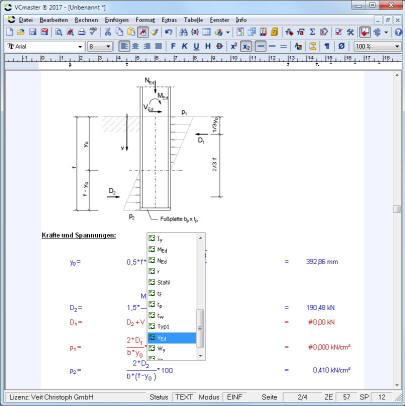
NEW: Fast entry for variables
This year's development focus for VCmaster
was on improving the handling of the software and simplifying data entry. VCmaster has been revised in many aspects to achieve this goal.
Major improvements:
- Extended options for design and formatting
- Faster dater entry due to the new favorites folder, pre-defined input lines and automated completion of variables (see images)
- Easier checking of indices for page numbering and for database queries
- VCcopy technology, an intelligent alternative to the Windows-clipboard (optional)
New features for designing and formatting
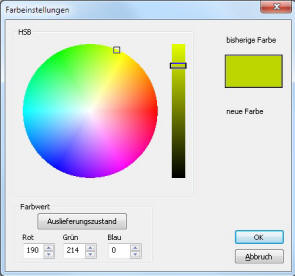
Until now we’ve deliberately kept the settings for formatting and designing as simple as possible. With VCmaster 2017 we have upgraded these options in line with customers' demands for more flexible designing options.
Text sections and headlines can be assigned individual settings for indentations in addition to the font. Format options can be transferred from one text or calculation line to any other text or calculation line.
Formatting of calculation lines can be deactivated, resulting in a default left-aligned presentation. For further information, please refer to
Chapter 2.4 Formatting calculation lines
The VCmaster color palette has been extended. In addition to a variety of new colors, VCmaster 2017 offers the option of setting a company specific color (image).
Copy & Paste at its best
The clipboard is an essential component of day-to-day work on the PC. Unfortunately, Windows only allows one element to be copied at a time.
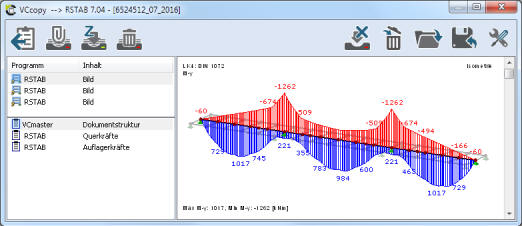
VCcopy is much more versatile.
It has expanded the Windows-Clipboard to up to 30 entries. Additionally VCcopy displays all entries in a preview. If need be VCcopy stores all entries and keeps them available over a long period of time.
VCcopy guarantees more flexibility and a better overview while working.
The program accelerates workflow and offers entirely new possibilities for copying data.
VCcopy is simply the better clipboard.
For more information, please refer to
Chapter 3.6.1 VCCopy-Technology
Accelerated data input

Input of variables is now significantly faster due to the new
fast-input-mode. The list is called up via CTRL+SPACE. VCmaster inserts the selected variable at the current cursor position. Selection is specified after entering the first letter(s). Calculation lines can be explicitly defined as
input lines. Reducing queries in the
input assistant to a minimum and leading to improved overview and faster data entry.
The new favorite folder in the
Template Explorer facilitates locating repeatedly used templates. The new feature also allows the compilation of a list of
reference projects, serving as a blueprint for new projects.
Advanced control features
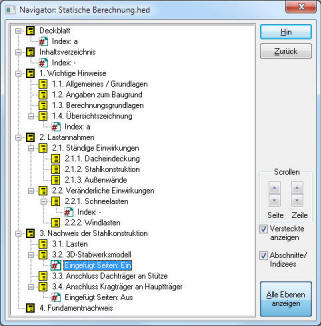
NEW: Display of segment changes in the navigator
The
navigator now displays inserted segment changes with the associated indices. Thus simplifying the review of entered data for modifications and amendments (image).
While inserting data with linked databases, the
database assistant displays the selected table for improved revision of information.
Verifying and installing patches has been updated. Restricted user rights are now taken into account, ensuring the installation of a new version in a timely manner.
Looking back on 2016
20 Years of Unique Cutting Edge Technical Innovations
With VCmaster 2016 we celebrated our 20th anniversary. Starting out 20 years ago as a simple calculation-tool for engineers, VCmaster has transformed into a powerful
software for digital documentation and technical calculations. It is currently used by over 4,000 satisfied customers in more than 40 countries around the globe.
The last few years have been dominated by
unparalleled innovations. For example:
- Ingenious t2W-technology: The unique cross-product
t2W-interface integrated into VCmaster enables seamless data transfer
from various external software applications (2006).
- Hybrid-technology: Combines the benefits of an interactive
word-processing application with the advantages of well-known
pdf-technology into one smart software-solution (2011).
- Introduction of wide-ranging libraries: A compilation of
hundreds of templates in accordance with the Eurocode (2012).
VCmaster 2016 is equipped with numerous
new features, which:
- further improve the quality of technical documents
- allow for trouble-free data portability
- significantly increase processing time
Enhanced t2W-interface guarantees smooth portability
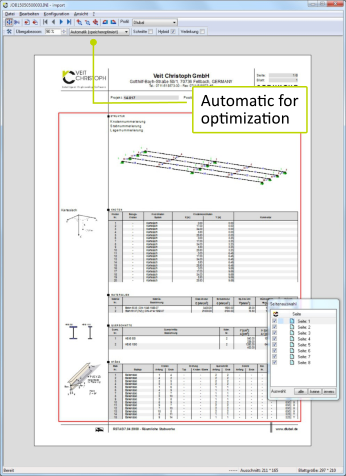
In order for the t2W-interface to deliver perfect results it must be adjusted optimally to the source program. Transferring files in the correct data format is particularly important.
So far only two options have been available: Vector format (EMF) or pixel format (JPG). These were assigned in the transfer profile of any given application.
An intriguing
third option has been added to V
Cmaster 2016: Automatic. Choosing this option allows the program to decide automatically, whether vector format or pixel format requires the least memory space.
The automatic option is especially interesting when data output contains memory intensive graphics on single pages. This is the case with most common framework programs (e.g. Dlubal). These pages are then automatically converted into a memory efficient JPG-format. Pages containing text and charts are converted into vector format, when first issued as such. If the user is unsure which transfer format is more suitable
Automatic is recommended.
For more information please refer to
Chapter 3.5 t2W-interface.
Partially hiding of chapters increases efficiency
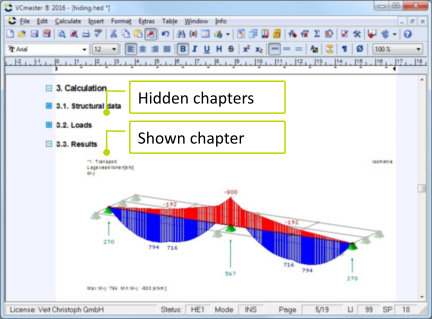
While working with large documents keeping track of everything can be a tough task. To tackle this issue VCmaster 2016 has been expanded to include a clever new feature. The user is now able to temporally hide unused or finished chapters. When required these chapters can be displayed at the click of a mouse.
This new feature reduces time-intensive scrolling and skimming to an absolute minimum. Additional outsourcing of parts of the document, which had been
practiced to maintain clarity, is henceforth unnecessary. From now on creating a document in a consistent layout is even simpler than before, all the more so if utilizing Hybrid-technology.
For more information please refer to
Chapter 4.3.5
Headings and table of contents
Intelligent control features guarantee improved security
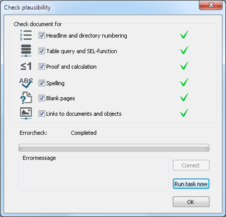
Errors easily sneak into complex documentations with their numerous changes and additions.
VCmaster 2016 includes a new feature, which is able to recognise and correct faulty data input, by having the document undergo extensive and vigorous tests.
The test checks the following:
- page numbering and directory numbering
- determining data from stored tables
- spelling as well as blank pages
- proper linking to outsourced files
For more information please refer to
Chapter 2.10.1
Checking documents
Exceptional layout with state-of-the-art textboxes
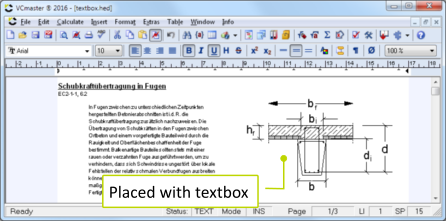
Textboxes allow for unlimited placement of special elements like graphics, legends or comments within in the document. The adjacent text can be aligned left or right of the textbox.
For more information please refer to
Chapter
5.2.4 Insert TextboxesThe same approach is used, when implementing and placing external graphics. These can, for example, be detailed drawings which are created and managed by an external program. The text boxes aspect ratio is automatically adjusted to the linked graphics.
For more information please refer to
Chapter 3.7.2 Integrate
Blueprint, Graphics and PDF-files
Sustainable thanks to progressive technology
VCmaster 2016 is equipped with a completely newly developed PDF-output. The novel version writes the PDF-file directly without the use of a ghost script driver. This accelerates the PDF-export and improves document quality tremendously, because fonts are now displayed at highest quality and the document contains precise formatting information without any loss of data.
The user interface has also been newly designed and now has a more modern and fresher appearance. For high-resolution screens VCmaster 2016 offers larger toolbars.
Additionally many other details have been improved in VCmaster.
For example:
Calculation lines can now be printed in black, while font colours remain untouched.

Looking back on 2015
Competitive edge through innovations and consistent, ongoing development
With the 2015 updates, we were
able to present numerous interesting innovations and improvements
of VCmaster. The key aspects of our updates are as follows:
Efficient documentation through...
- new indexing for images and attachments
- integration of layouts and PDF documents
More intelligent calculation through...
- automatic conversion of units of measurement
- advanced variable names and navigation to variable definitions
- the if () - functions with text return
Simpler operation through...
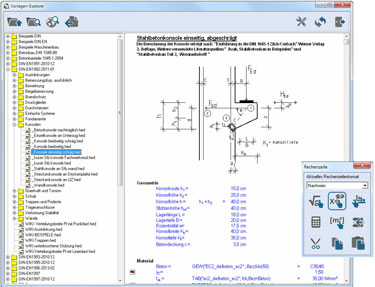
- re-engineered tools and tool boxes (see picture on the right)
Apart from the modifications in the program, the newly printed
German Handbook is also an integral part of the 2015 updates.
The new Eurocode-templates
according DIN EN1994 (Concrete) were published in the fourth quarter.
With the delivery of
VCmaster Edycja polska, we now deliver our software in three languages. To intensify the market penetration in Poland, we have developed the templates
according to PN EN1991, PN EN1992, PN EN1993 and PN EN1995 norms. The University of Cracow has been using VCmaster since its Beta-phase. Our new sales office is also
located in Cracow, Poland.
You can find it under:
www.VCmaster.pl.
Information on the new features:
- Indices: VCmaster now offers the chance to
generate
three more indices apart from the table of contents. For
e.g. an image or an attachment index.
- Integration of Layouts: VCmaster can now
integrate any desired PDF data files. The separate page formats can
be differentiated in VCmaster and then be made in to a single PDF
document.
- Conversion of units of measurement: On creation
of a formula, every variable will take the allocated unit of
measurement as expected by the formula. The advantage is that the
formula will always be correctly calculated irrespective of the unit
of measurement allocated to the underlying variable.
- Example: Given L = 4,00 m and B = 80,00 cm; You
write:
- Area A = L#[m] * B#[m]
- VCmaster generates a graphical formula and writes:
- Area A = L * B = 4,00 * 0,80 = 3,20 m² I)
- Advanced variable names: Variables can now have
country specific alphabetical characters. In addition to that all
phrases in square brackets would no longer be interpreted
mathematically so that variable like M[G+Q] possible.
- Navigation to variable definition: The
values
of a variable can be checked and their respective definition can be
provided by simple navigation.
- if ()-Functions:
These can now return a text
back. Example: If( FEd / FRd
≤ 1; "valid" ; "invalid")
- Other improvements:
- The improved import and export settings
- The acceptance of entries from the Windows- "Start-menu" in
the VCmaster-menu list
- A general recall/linking option in the t2W-interface (if it
is technically possible)
Looking back on 2014
The calculation section of VCmaster has been almost entirely re-programmed. One the one hand, its performance is
noticeably faster
and the other it represents an important basis for future developments and enhancements.
New features are
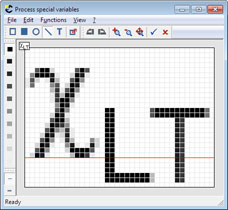
freely configurable formula symbols, which eliminate any restrictions on variable names. This improves the presentation of graphic formulae.
The word processing section has also been extensively revised. This is particularly noticeable when scrolling through graphics. The cursor control behaves
in the same way as in other text programs.
Detailed information on the new features:
Further additions and enhancements:
- The t2W interface now allows blank spaces at the top and bottom to be removed automatically. This speeds up navigation using
PageUp and PageDown and also page selection using the space bar.
- The newly developed t2W interface for Windows 8 had already been released with Patch 2013.07. This works noticeably faster and has now been installed for Windows 7.
- All graphics in a selected area can now be scaled.
- Working in normal tables has been significantly improved and sped up.
- The navigator starts automatically if it was open at the end of the program
- Headings in hidden areas are not included in the contents list.
- Buttons for Template Explorer, From reference project and
Backview window are pressed when the relevant program is started.
- If several files are open when the program is closed, the relevant file is shown with the
save changes prompt.
- In addition to the VCmaster upgrades, we also offer many new Eurocode templates in accordance with DIN EN1996 (Masonry Structures) und DIN EN1997 (Foundation Engineering).